
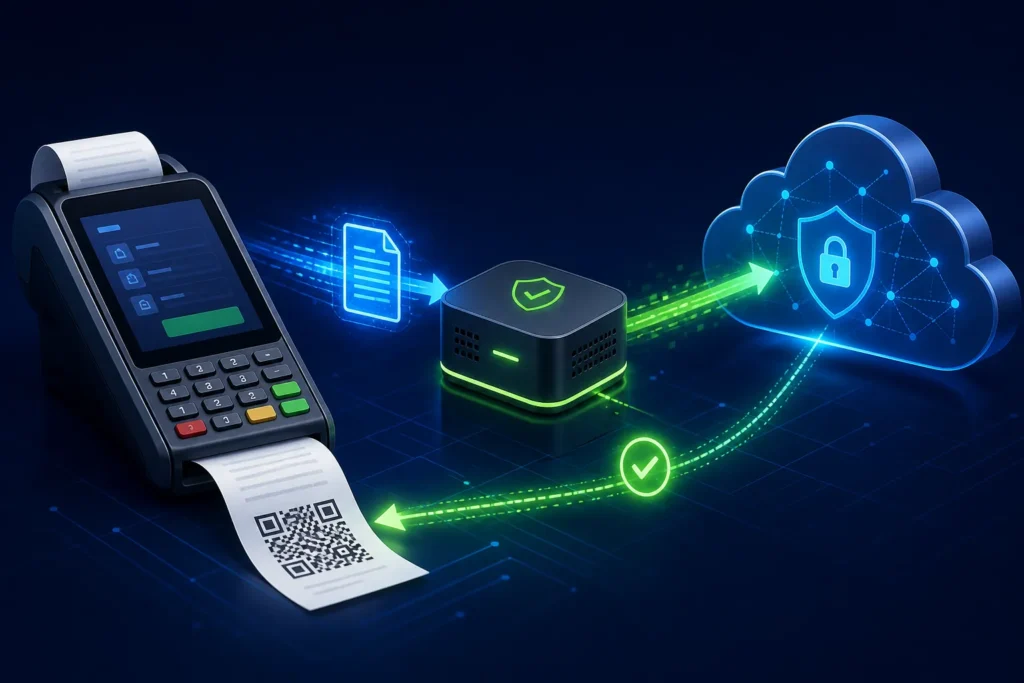
The PRA Software Fiscal Device (SFD) is a software component described by PRA/PRAL for fiscalising POS invoices. In the published local architecture, the POS sends invoice data to a service on the same computer, receives a fiscal invoice number, prints that number and a vendor-generated QR code on the customer receipt, while the component periodically moves recorded invoice data to PRA’s online system. The same specification also documents sandbox and production cloud-posting endpoints, so implementers must choose and test the supported architecture for the actual deployment.
Reviewed 28 August 2026. This article explains software implementation, not legal or tax advice. Businesses should confirm current PRA applicability, registration, service classification, rates and notices for their own circumstances through PRA or a qualified adviser.
The documented fiscalisation flow
POS order and totals → invoice model → local SFD or supported cloud path → fiscal response → receipt with fiscal number and QR → reporting and reconciliation
This sequence should begin only when the business transaction is ready to become a controlled invoice. A restaurant KOT, quotation or open table is not automatically the same thing as a final fiscal invoice.
What the SFD does—and does not do
| Function | What it means |
|---|---|
| Receives invoice data | The POS prepares required header and item fields in the documented model. |
| Returns a fiscal reference | The response includes a PRA invoice number when successful. |
| Supports receipt output | The POS/vendor prints the fiscal number and generates the QR link in the required format. |
| Moves data onward | The local component is described as periodically uploading recorded invoices. |
| Does not decide tax advice | Software cannot determine every business’s legal applicability, rate or treatment without authorized configuration. |
| Does not replace POS operations | Menu, KOT, discounts, payments, stock and closing remain the responsibility of the business software. |
Local SFD architecture
The specification describes installing the component on the same Windows computer as the POS. It documents a self-hosted HTTP service on localhost and provides endpoints for service health and invoice submission. This keeps the fiscalisation call inside the local machine while the component manages onward communication.
Operationally, that design means the implementation team must monitor more than the internet connection. The Windows service, installation folder, local files, POS-to-service call, permissions and device configuration all matter.
Cloud posting architecture
Version 1.2 also includes examples for posting from a cloud application to separate sandbox and production URLs using bearer authorization. It further discusses production IP whitelisting and secure TLS verification. A vendor should not describe every PRA connection as a generic public API; the supported path and controls should be confirmed for the taxpayer’s actual deployment.
Important invoice fields in plain language
| Field | Business meaning | Control |
|---|---|---|
| POSID | The registered POS identity | Map to the correct branch and counter |
| USIN | The business’s own unique invoice number | Never recycle it; use it for duplicate prevention |
| RefUSIN | Reference to the business invoice being adjusted | Use in the supported credit/debit workflow |
| DateTime | Invoice date and time | Keep system time accurate |
| PaymentMode | Cash, card or another documented mode | Reconcile with settlement records |
| InvoiceType | New, debit or credit | Restrict correction actions |
| Items | Services/items, quantities, classification, value, tax and totals | Validate header totals against line totals |
Why USIN is essential for duplicate prevention
The fiscal number comes from the fiscalisation response, but the USIN belongs to the business system. It gives the POS a stable reference before and after submission. If the connection drops after the authority-side process but before the POS displays the response, the system should first investigate by USIN and logs rather than generating a new invoice and sending it blindly.
Receipt and QR responsibilities
The specification says the returned PRA invoice number should be printed on the customer receipt with a QR code. Its FAQ explains that QR generation is at the vendor’s end and points the QR to the official invoice-search URL with the PRA invoice number. That makes receipt-template testing a software task, not merely a printer task.
Use the PRA invoice verification guide to test scan quality, printed references and portal matching.
Installation and security controls
- Use a supported Windows environment and current prerequisites from PRA.
- Install with approved administrator access, then remove unnecessary admin rights from daily users.
- Protect the component’s local files and backups.
- Restrict POS IDs, access codes, tokens and production configuration.
- Verify TLS certificates; do not copy insecure sample-code shortcuts into production.
- Record the component version, install date, device, branch, counter and support owner.
- Monitor service health without exposing credentials in screenshots.
How to test the architecture
- Confirm the health endpoint responds.
- Submit a controlled sandbox invoice.
- Validate field totals and response handling.
- Print the receipt and scan the QR.
- Test an approved credit/return scenario.
- Restart the computer and confirm service recovery.
- Interrupt connectivity in a safe test and observe status behavior.
- Reconcile POS, component and official-report records.
- Confirm logs make uncertain outcomes diagnosable.
Common misconceptions
- “The SFD is the whole POS.” It is the fiscalisation component; restaurant or business operations still need a capable POS.
- “The QR comes from the printer.” The vendor software generates the QR content and the printer renders it.
- “A successful local call proves online reporting forever.” Ongoing reconciliation is still required.
- “One configuration fits every branch.” Branch and POS identities must remain controlled.
- “The old sample code is production-ready.” Security, TLS, error handling and current endpoints must be reviewed.
Frequently asked questions
Is the PRA SFD a physical device?
The published document describes a software fiscal device/component, not simply a separate hardware box.
Can a cloud POS connect?
The specification includes cloud posting examples, but the production route, authorization, IP controls and current acceptance should be confirmed for the deployment.
Who generates the QR code?
The specification’s FAQ says QR functionality is at the vendor end, using the returned PRA invoice number in the official search URL.
Can one SFD configuration be copied to another counter?
Do not copy identities casually. Each branch/counter mapping and POS registration should be reviewed and documented.
Need an SFD architecture review?
NexZion Solutions can assess whether the current POS should use a local component or supported cloud integration path, map invoice fields, protect credentials, test receipts and establish reconciliation controls.
Discuss PRA SFD Integration PRA eIMS software installation & integration PRA eIMS installer guide
Official sources and review note
The technical specification is an implementation document, not a complete statement of every current legal obligation. NexZion reviewed the official pages above on 28 August 2026 and recommends reconfirming production details before go-live.
Related: PRA POS registration, PRA troubleshooting, NexZion POS, and company profile.
Advanced PRA implementation guides
NexZion Solutions publishes practical guides based on business-software, compliance-workflow, website and automation implementation experience in Pakistan.


