
POS Software in Pakistan for Billing, Inventory & Multi-Branch Retail
NexZion POS brings billing, inventory, purchases, expenses and reporting into one cloud system for retailers in Pakistan. Open a sample business to see how sales and stock are managed across counters and locations.
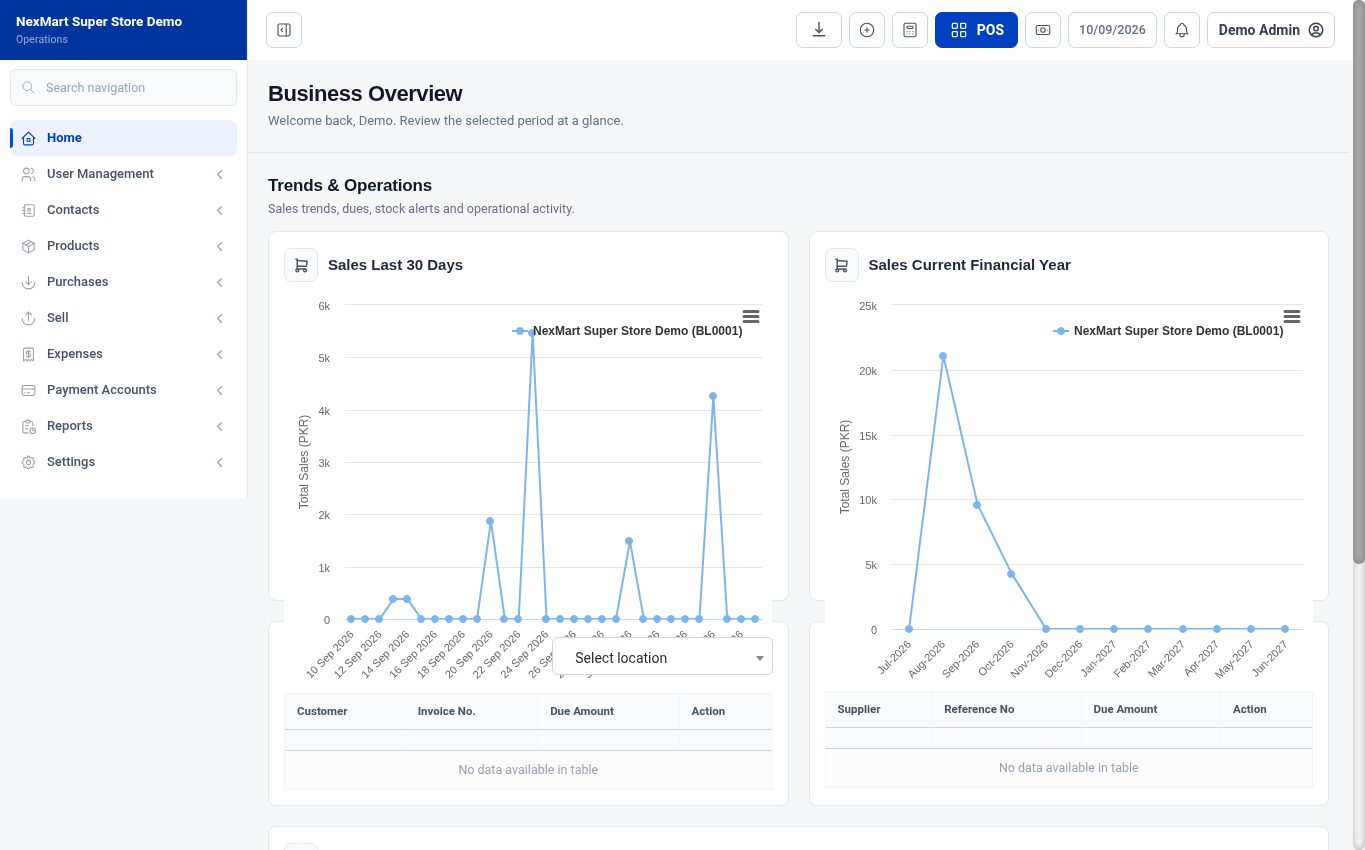
See the software before signing up.
Real interface captures from the public NexMart Super Store demonstration. Review the sales counter, stock management and dashboard, then use the live demo directory to choose a business example for your operation.
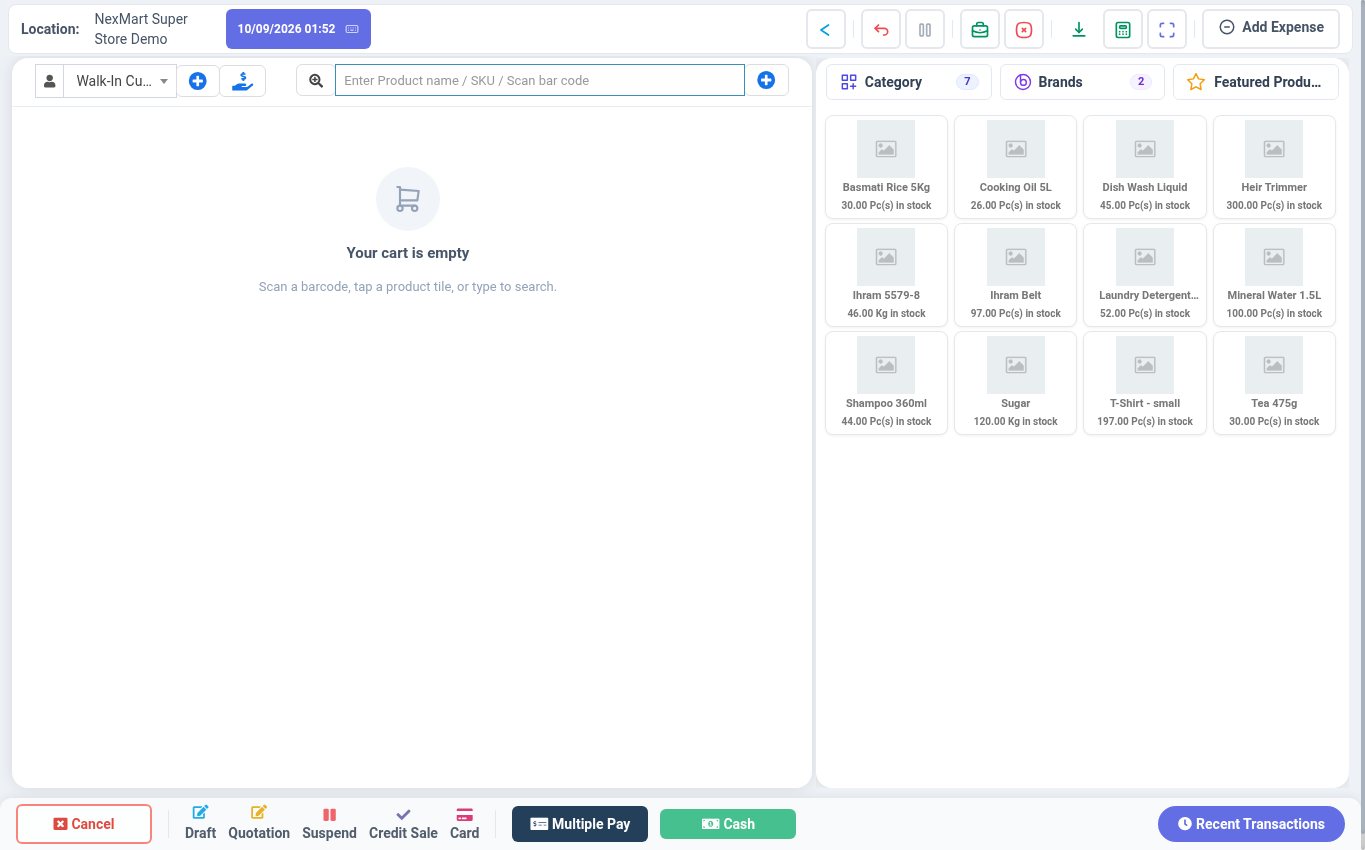
Fast counter billing
Find products, scan barcodes, select a customer and access the checkout actions.
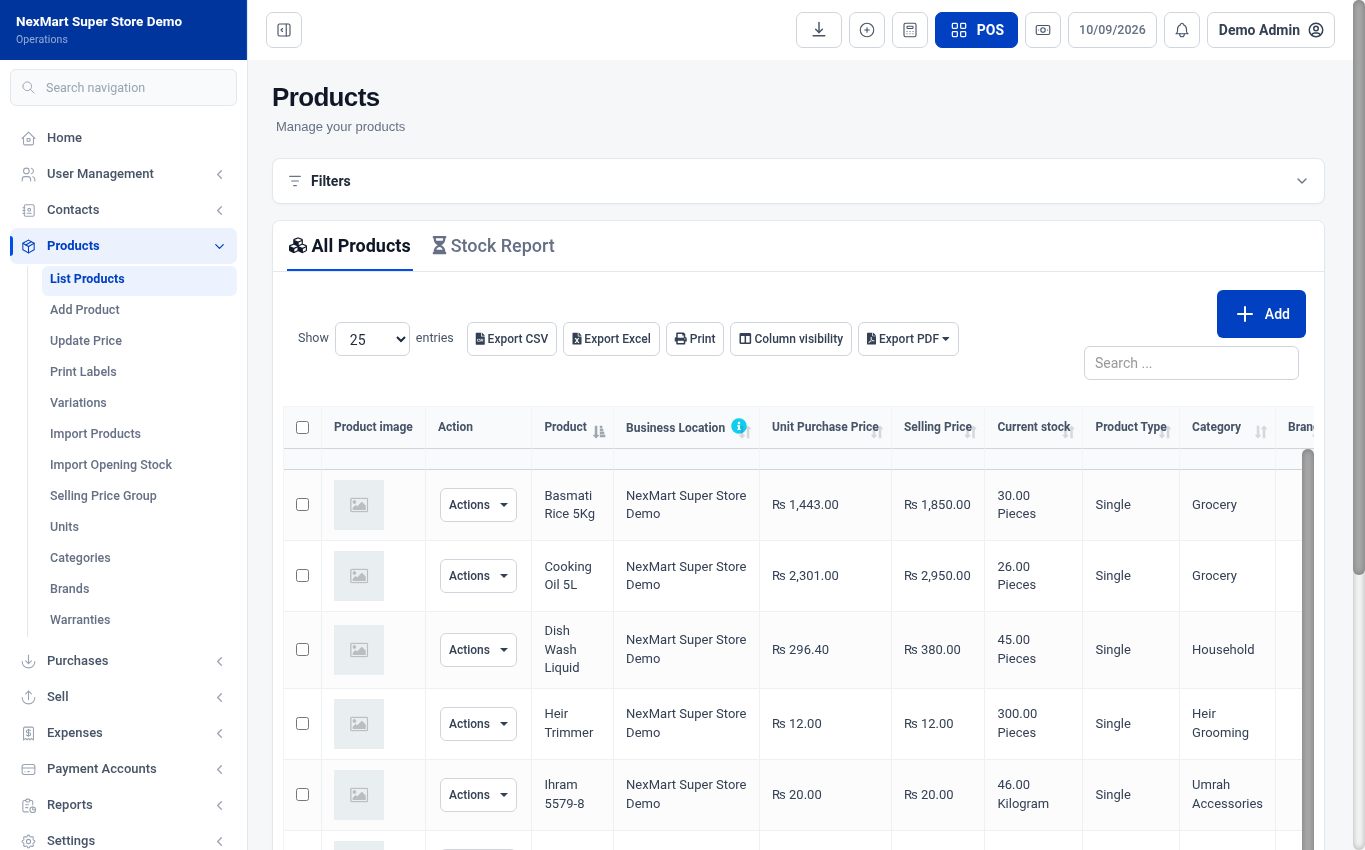
Products and stock
Review items, purchase and selling prices, locations, quantities and stock tools.
Business overview
Explore sales trends, operational summaries and the menus that connect daily work.
What is NexZion POS?
NexZion POS is a cloud-based point-of-sale and business management system for shops, general stores, retailers and growing multi-user or multi-location businesses. It connects daily billing with inventory, purchases, expenses, parties, employees and management reports.
For supermarkets, marts and high-volume retail with multiple counters, barcode-heavy checkout and tighter stock control, see our Superstore Software in Pakistan guide.
Comparing software for a retail shop? Use our shop management software guide for Pakistan to evaluate POS billing, stock, purchases, khata, cashier closing, reports, hardware and implementation. For businesses deciding between a retail POS and a wider company system, read our ERP vs POS comparison.
For a multi-branch setup, review stock by location and ask about user permissions and consolidated reporting before choosing a plan.
Control more than only the sales counter
The system combines fast POS work with the records an owner needs to understand stock, spending, parties and staff activity.
Billing and returns
Create sales, find products quickly, manage returns, print receipts and review daily sales activity.
Inventory and purchases
Maintain products, opening stock, purchases, suppliers, stock movement and essential inventory reports.
Expenses and cash control
Record operating expenses and review business activity without maintaining a separate manual register.
Customers and suppliers
Keep customer and supplier records connected with sales, purchases and business transactions.
Employees and HRM
Ask about employee records, attendance and payroll when scoping the modules your team needs.
Business reports
Review sales, stock and operational summaries so management can make decisions from current records.
NexZion POS pricing and branches
Tell us how many outlets, counters and staff will use the software. We’ll confirm current pricing, supported locations and the right setup for your business.
Single shop
Review barcode billing, daily stock, purchasing and end-of-day reports for your counter.
Multiple branches
Ask about location-level stock, transfers between outlets, staff permissions and consolidated reporting.
Setup and onboarding
Discuss your product import, hardware, training and any FBR or PRA integration you need.
What to check in a POS demo
Open a sample business
Choose a demo similar to your retail or distribution operation.
Follow a sale
Review item lookup, barcode billing, returns and the receipt customers receive.
Check stock and reporting
Review purchases, stock movement, location-level figures and daily reports in the available demo.
Discuss your setup
Share your number of outlets and users so NexZion can confirm the plan, migration and rollout.
Standard POS subscription and regulatory integration are separate decisions
NexZion POS packages cover the product features displayed on the pricing page. FBR POS, FBR Digital Invoicing, PRA integration, custom reports, migration and specialized workflows should be confirmed separately according to the business and current requirement. If you need retail POS together with a tax-connected workflow, see our POS software with FBR integration in Pakistan decision page. Retailers specifically researching FBR POS should use the dedicated FBR POS Integration Pakistan implementation page.
FBR or PRA integration
Availability, setup and charges depend on the applicable framework, credentials, business category and required testing.
Data migration
Large product lists, opening balances or historical records may require cleanup and a separately agreed import process.
Hardware
Computers, barcode scanners, thermal printers, cash drawers, labels and backup power are normally arranged separately.
NexZion POS questions
Can I see the software before choosing a plan?
Live sample businesses
Open a public demo to explore billing, stock, purchasing and reports using sample data.
How do I get current POS pricing?
Plan enquiry
Tell us how many counters, locations and users you need. We’ll confirm pricing and setup for your business.
Can I use NexZion POS across multiple branches?
Multi-location setup
NexZion POS supports multi-location workflows. Confirm branch limits, user access, stock transfers and reporting during a plan enquiry.
Is hardware included?
Usually separate
Tell us which barcode scanners, receipt printers and cash drawers you already use. We’ll confirm compatible hardware and any installation services.
Is FBR integration included?
Confirm separately
Regulatory integration should be confirmed separately because requirements and implementation scope depend on the business.
Need POS software for a restaurant or cafe?
Restaurant billing should connect tables, KOT/KDS, kitchen workflow, menu control, payments and daily closing. See our restaurant POS and management software guide for the full buyer checklist.
Need POS software for a pharmacy or medical store?
Medicine retail needs stronger stock control than generic counter billing. Review our pharmacy POS and inventory software guide for batches, expiry, purchases, suppliers, billing, returns and reports.
Need POS software for a salon, spa or bridal studio?
Service businesses need appointments, staff commissions, packages and customer history alongside billing. See our PRA salon and bridal POS software guide for commissions, packages, products, fiscal receipts and daily closing.
Running a car workshop or service center?
Job-card businesses need more than counter billing. See our car service center and auto workshop software guide for vehicle history, estimates, parts, mechanics, billing and reminders.
Explore NexZion POS support by business location
The product, pricing and core workflow stay centralized on this page. City pages add local operating context and link back here for the full product decision.
POS Software Lahore
For higher-volume retail, multi-counter workflows, staff roles and branch visibility.
POS Software Faisalabad
For retail, wholesale and stock-heavy businesses that need controlled product and inventory routines.
POS Software Multan
For counter sales, repeat buyers, purchases and distribution-style stock movement.
POS Software Pakpattan
For local shops that need simple billing, stock routines and clear daily closing.
Check real shop workflows before choosing a POS plan
These guides help owners compare daily requirements, organize cashier closing and plan specialized inventory without guessing which modules they need.
Choose POS software by business type
Compare the workflows of retail shops, pharmacies, restaurants, wholesalers and service counters before choosing billing and stock features.
Use a free daily closing sheet
Review a reusable cashier reconciliation template for checking sales, payment methods, cash differences and handover at the end of a shift.
Plan clothing-store sizes and colors
Understand stock variants, discounts, exchanges and size-level reporting for fashion and apparel inventory.
Before making a purchase decision, use the 12-test POS software selection checklist to compare billing, stock, user permissions, backup procedures and applicable fiscal integrations.
See named NexZion POS and Digital Invoicing implementations
Selected NexZion implementations include Baba Farid Battery Centre, PIR JEE AUTOS, Mehar Unique Center and Waseem Brothers and Sons, alongside other retail and tax-connected businesses. Review the verified implementation directory for the broader client list and project types.
Review Client ImplementationsSee NexZion POS in a live demo
Open a sample business to walk through billing, stock and reporting, or ask us about pricing for your outlets.