
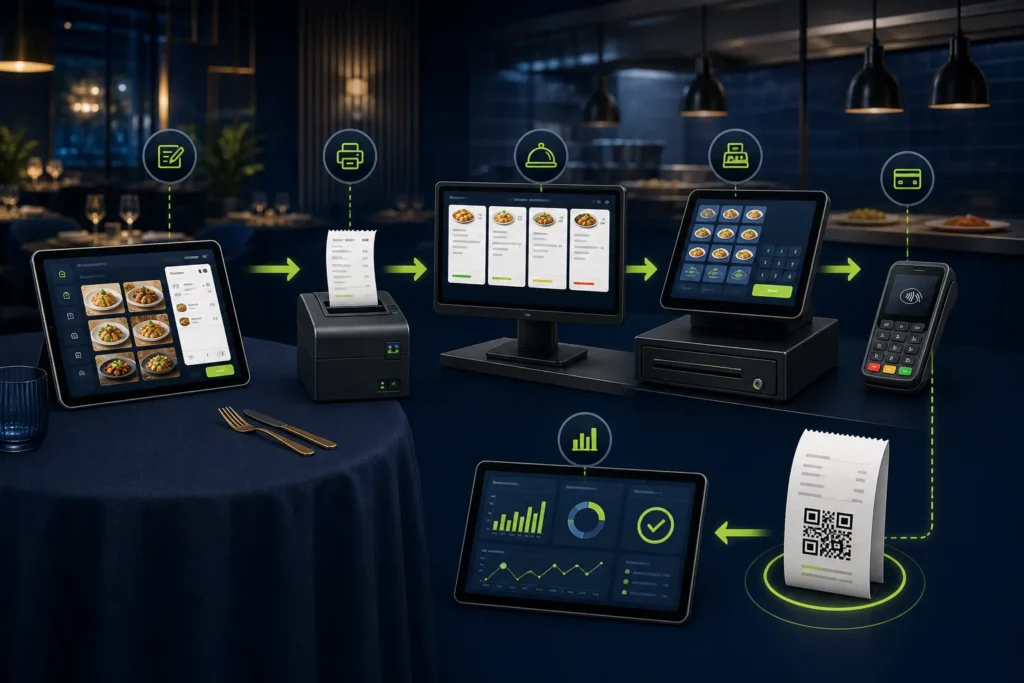
A restaurant’s PRA fiscal invoice should be created from the final controlled bill—not directly from an open table or kitchen order ticket. The practical flow is table/channel → order → KOT → item and discount review → payment → final POS invoice → supported PRA fiscalisation → receipt with fiscal number and QR → shift reconciliation. Keep every cancellation, complimentary item, refund and retry visible so kitchen, cash, stock and fiscal records remain explainable.
Reviewed 28 August 2026. This article covers software and operational workflow, not legal or tax advice. Confirm current PRA applicability, service classification, rates, notices and invoice treatment for the specific business.
End-to-end restaurant billing flow
Table / takeaway / delivery → order → KOT/KDS → preparation changes → final bill review → discount approval → payment → invoice + USIN → fiscalisation → fiscal number + QR receipt → closing and reconciliation
KOT and fiscal invoice are different records
| Record | Purpose | Should contain |
|---|---|---|
| Order | Customer request and channel | Table/customer, items, modifiers, notes |
| KOT/KDS ticket | Kitchen preparation | Items, quantities, station and instructions |
| Final bill | Approved amount due | Chargeable items, discounts, charges and total |
| Fiscal invoice | Controlled invoice record | Required invoice fields, USIN, response and fiscal number |
| Receipt | Customer evidence | Readable totals, fiscal reference and QR |
1. Start from the order channel
Dine-in starts with a table and waiter, takeaway at a counter or phone, delivery through direct or third-party channels, and banquet orders through a booking. Preserve the channel for reporting but apply one approved calculation method.
2. Build a clean menu
- Stable item code and customer-facing name
- Category and kitchen station
- Size/variant and modifiers
- Approved price and effective date
- Applicable classification/treatment confirmed by adviser
- Branch availability
- Recipe/stock link where used
- Active/discontinued status
Avoid normal billing through “miscellaneous food” or free text.
3. Route KOTs without changing the invoice identity
Multiple KOTs may belong to one table: starters, mains and later additions. The POS should consolidate approved chargeable items into one final bill while preserving every kitchen event. A KOT reprint must not duplicate an order or trigger fiscalisation.
4. Handle modifications and cancellations
If an item is cancelled before preparation, record the reason. If preparation has started, record waste or manager approval. If the final invoice was already issued, use the supported return/credit process rather than editing or deleting the original.
5. Control packages, combos and modifiers
A deal can display as one customer-facing package while components drive kitchen and inventory. Decide the invoice representation with accounting and implementation teams. Extras—cheese, topping, delivery charge or additional serving—should use approved items.
6. Calculate the final bill once
| Component | Control |
|---|---|
| Quantity × price | Use effective menu price |
| Item discount | Record amount, reason and approver |
| Bill discount | Apply consistently to eligible lines |
| Charges | Use approved service/delivery records |
| Tax | Use current authorized configuration |
| Rounding | Same on screen, payload, receipt and report |
| Grand total | Match amount collected and invoice model |
7. Approve discounts and complimentary items
Cashiers can have a small discount limit; larger discounts require supervisor approval. Keep staff meals, promotions, spoilage and customer-recovery gestures in separate reason codes. This protects margin and explains differences between KOT consumption and billed revenue.
8. Collect and reconcile payment
Capture cash, card, approved mixed payment or another configured mode. Store gateway/terminal references where appropriate. The payment record and invoice should agree; fiscalisation is not a substitute for cash-drawer or bank settlement controls.
9. Create the final invoice and USIN
Generate one stable unique business invoice number when the bill is finalized. Lock commercial fields before fiscalisation. The USIN should survive timeouts and retries so the system can determine whether the same transaction was already accepted.
10. Fiscalise and store the response
Submit through the configured local SFD or supported cloud path. Store the request status, timestamp, response, fiscal invoice number and any diagnostic details on the same invoice. Do not print “successful” until the workflow has evidence.
11. Print the customer receipt
Print the business and transaction details required for the restaurant, the returned fiscal reference and the QR link. Test actual thermal printers for clipping, fading and scan quality. Reprint an accepted invoice without resubmitting it.
12. Close the shift
- Gross and net sales
- Discounts and complimentary items
- Cancelled items and waste
- Returns and refunds
- Cash, card and other payments
- Expected versus counted cash
- Accepted, failed, queued and uncertain fiscal statuses
- Invoice and KOT exception count
Role-based responsibilities
| Role | Key responsibilities |
|---|---|
| Waiter | Accurate table/order and modifiers |
| Kitchen | KOT status and preparation exceptions |
| Cashier | Final bill, payment, submission and receipt |
| Supervisor | Discount, cancellation, retry and reprint approvals |
| Accounts | Payment and fiscal reconciliation |
| IT/support | Service health, logs and controlled releases |
Go-live test scenarios
- Dine-in with multiple KOTs
- Takeaway with modifier
- Delivery with approved charge
- Combo/package
- Discount and complimentary item
- Split/mixed payment where supported
- Item cancellation before and after preparation
- Return/credit after invoice
- Printer failure after fiscal response
- Network timeout and duplicate-prevention check
- Cashier shift handover
- End-of-day reconciliation
Frequently asked questions
Should a KOT be sent to PRA?
The final invoice data is the fiscalisation event described in the technical model. A KOT is an operational kitchen record.
Can dine-in, takeaway and delivery use one POS?
Yes, if channel differences are preserved while billing calculations and fiscal controls remain consistent.
Can a receipt be reprinted?
Yes through a controlled reprint of the same accepted invoice. Reprint must not create a new submission.
How should restaurant returns be handled?
Separate open-order cancellation from issued-invoice adjustment and customer refund. See the returns guide.
If you are comparing the underlying restaurant system before PRA integration, read our restaurant POS and management software buyer guide.
Need restaurant PRA POS setup?
NexZion Solutions can assess the current table/KOT workflow, clean the menu, configure roles and receipts, test real orders and support monitored go-live.
Get Restaurant PRA POS Setup PRA eIMS software installation & POS integration PRA eIMS installer guide
Official sources reviewed
- PRA Software Fiscal Device Technical Specification, version 1.2
- PRA POS invoice-search facility
- PRA IRIS
- Punjab Sales Tax on Services Act 2012, Chapter V
Reviewed 28 August 2026. The technical specification and public portals can change; verify production behavior and current legal requirements before relying on them.
Related: integrate or replace an existing POS, go-live tests, multi-branch setup, and NexZion POS.
NexZion Solutions publishes practical guides based on business-software, compliance-workflow, website and automation implementation experience in Pakistan.

