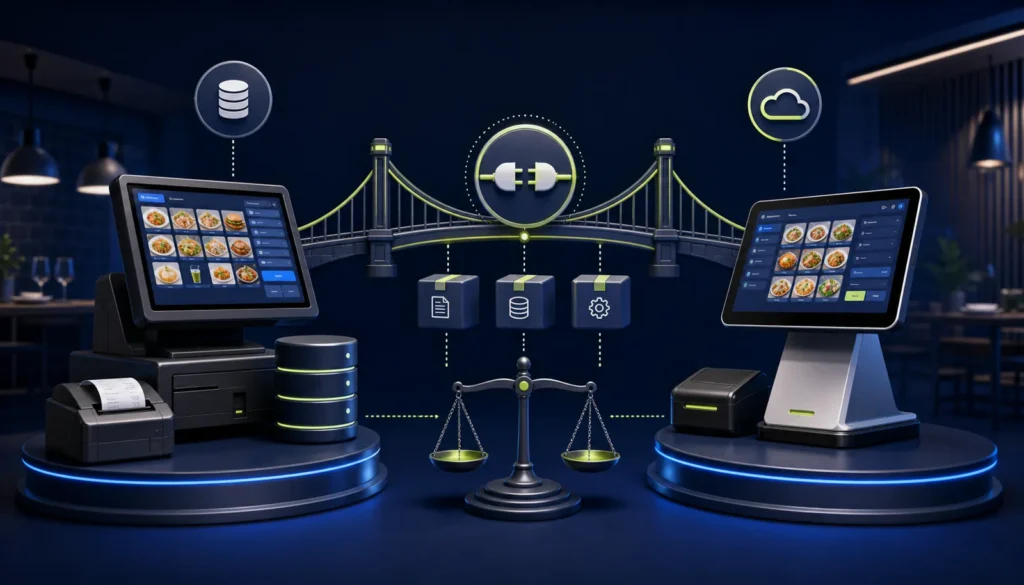
Keep and integrate an existing restaurant POS when it already runs tables, KOT, menu modifiers, discounts, payments and reporting reliably—and the owner or vendor can provide safe access to finalized invoice data, stable unique invoice numbers, receipt printing and deployment support. Replace it when the system is unsupported, inaccessible, cannot preserve invoice identity, has weak controls or would require a fragile parallel workflow. The cheapest connector is not always the lowest-risk choice.
Reviewed 28 August 2026. This is operational software guidance, not tax or legal advice. Confirm current PRA applicability, rates, service classifications, notices and correction requirements for the business’s individual circumstances.
Start with the restaurant, not the connector
A restaurant’s final invoice sits at the end of a longer flow: table or channel → order → KOT → preparation → changes → discount approval → payment → controlled invoice → fiscalisation → receipt → closing. If a new integration breaks KOT timing, split bills or cashier speed, the project has failed even if a sample payload is accepted.
Decision matrix
| Question | Integrate existing POS when… | Replace when… |
|---|---|---|
| Source/API access | Final invoice and status hooks are accessible | Vendor refuses access or only supports manual export |
| USIN/identity | Every invoice has a stable unique number | Numbers change, recycle or disappear on retry |
| KOT workflow | Kitchen operations are reliable | Frequent lost tickets or disconnected billing |
| Receipt | Template can store/print fiscal number and QR | Printer output cannot be changed safely |
| Data ownership | Business can export menu, invoices and reports | Data is locked in an unsupported database |
| Support | Current vendor will cooperate and document changes | Product is abandoned or vendor access is uncontrolled |
| Migration risk | Integration is smaller than replacement | Legacy defects make the connector more complex than migration |
Technical access checklist
- Database or supported API access
- Event when an invoice becomes final
- Immutable invoice number before submission
- Header and line-item totals
- Item/service classification and tax configuration
- Payment modes and settlements
- Return/credit reference to original invoice
- Storage for fiscal number, status, response and attempts
- Receipt-template customization
- Background queue or local service integration
- Role-based retry and reprint
- Logs suitable for reconciliation
Restaurant workflow checklist
Test dine-in, takeaway, delivery, table transfer, item modifiers, packages, kitchen notes, KOT reprint, item cancellation, split bill, discount, complimentary item, cash/card/mixed payment, return and shift closing. A connector that only handles one simple counter sale is not ready for a real restaurant.
Option 1: integrate the existing POS
Advantages
- Lower disruption to staff and kitchen
- Preserves menu, recipes and historical reporting
- Reuses existing hardware when suitable
- Smaller training scope
Risks
- Connector depends on undocumented legacy behavior
- Vendor upgrades can break the integration
- Weak database design may create duplicate risks
- Two support teams may blame each other
Mitigate these with a written interface contract, version control, test environment, monitoring and support responsibilities.
Option 2: replace the POS
Advantages
- One product can own order, fiscalisation and reconciliation
- Opportunity to improve permissions, menu and reporting
- Cleaner support and release process
Risks
- Menu and opening balances may migrate incorrectly
- Staff may struggle during busy shifts
- KOT/printer routing can fail after go-live
- Historical comparisons may be lost
A replacement requires a staged migration, parallel validation and realistic restaurant user acceptance testing.
Option 3: temporary parallel workflow
A separate PRA billing application may look quick, but re-entering sales creates mismatched items, totals, times and payments. Use a parallel system only as a formally approved temporary design with clear reconciliation; it is rarely a strong permanent architecture.
Total cost of ownership
| Cost | Integrate | Replace |
|---|---|---|
| Development/configuration | Connector and legacy changes | New product setup |
| Data | Mapping and ongoing interface | Migration and archival access |
| Training | Fiscal statuses and exceptions | Full restaurant workflow |
| Downtime | Integration cutover | Operational cutover |
| Support | Coordination between vendors | Single vendor but broader dependency |
| Future changes | Maintain connector compatibility | Product roadmap and subscription |
Use the PRA POS integration cost guide to structure quotations without assuming a universal price.
Proof-of-concept before deciding
- Export one complete invoice with items and payment.
- Show where USIN is created and locked.
- Demonstrate storing the fiscal response.
- Print a receipt with fiscal number and QR.
- Simulate a timeout and prove duplicate prevention.
- Process a controlled return/credit.
- Run a shift reconciliation.
- Estimate support and upgrade impact.
Data migration controls if replacing
- Freeze and deduplicate menu records
- Map categories, variants, modifiers and package components
- Decide what historical invoices remain read-only
- Reconcile open tables, advances, customer credits and gift balances
- Test kitchen-printer routes and device drivers
- Keep a rollback plan and archived legacy access
Frequently asked questions
Can any restaurant POS be connected to PRA eIMS?
No. It needs suitable access, invoice identity, field data, status storage, receipt control and support. A closed or abandoned product may not be safely integrable.
Do we need source code?
Not always. A supported API, plugin framework or vendor-developed connector may be enough. What matters is controlled access and long-term maintainability.
Can NexZion integrate another vendor’s POS?
It depends on technical access and authorization. NexZion can assess the current system and recommend integration, cooperation with the vendor or replacement.
How do we reduce migration disruption?
Clean data, test actual KOT and billing scenarios, train by role, pilot at one counter and reconcile before full rollout.
Unsure whether to integrate or replace?
NexZion Solutions can assess your current POS, data ownership, KOT and receipt workflow, integration access, migration risk and support model before proposing a scoped path.
Discuss Existing POS Integration PRA eIMS software installation & POS integration
Official sources reviewed
- PRA Software Fiscal Device Technical Specification, version 1.2
- official PRA portal
- official PRA POS invoice-search facility
Reviewed 28 August 2026. The technical specification explains an implementation model but is not a complete statement of every current legal requirement. Reconfirm production details before relying on them.
Related: restaurant KOT-to-invoice workflow, sandbox testing, restaurant PRA POS guide, and NexZion POS.
NexZion Solutions publishes practical guides based on business-software, compliance-workflow, website and automation implementation experience in Pakistan.