
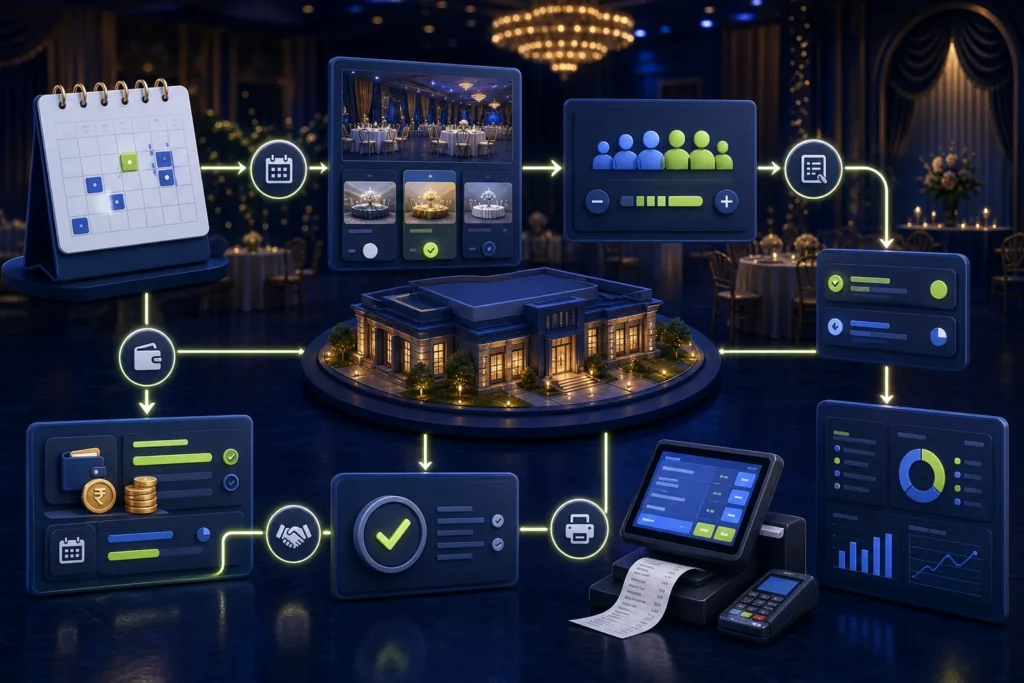
A marriage hall system should keep the event contract and operational ledger separate from the final controlled invoice. The practical flow is enquiry → booking → venue/date → package and estimated guest count → advances/instalments → event changes and extras → approved final guest count → final settlement → supported PRA invoice workflow → receipt → profitability and receivable reporting. When an advance becomes taxable or invoiceable is a current accounting/tax decision, not something the POS vendor should guess.
Reviewed 28 August 2026. This article covers software and operational workflow, not legal or tax advice. Confirm current PRA applicability, service classification, rates, notices and invoice treatment for the specific business.
One event needs one connected record
Without a central event record, sales staff keep the booking in WhatsApp, accounts keep advances in a ledger, kitchen uses a guest estimate and the cashier creates a separate final bill. The system should connect them while retaining approvals and history.
Core event record
- Booking number and customer
- Event date, time, venue and function type
- Package, menu and inclusions
- Estimated and guaranteed guest count
- Per-head or fixed pricing
- Hall, catering and additional services
- Advance and instalment schedule
- Discount and complimentary approvals
- Final settlement and outstanding balance
- Invoice/fiscal status and payment method
Booking-to-invoice workflow
- Enquiry and quotation. Record options without treating an unaccepted quotation as revenue.
- Availability hold. Time-limit tentative reservations to avoid double booking.
- Confirmed booking. Approve venue, package, dates and commercial terms.
- Advance/instalment. Record payment against the event and issue the appropriate operational receipt.
- Change control. Version guest count, menu, décor and extras.
- Event delivery. Record actual services, attendance basis and approved exceptions.
- Final settlement. Calculate package, approved guest count, extras, discounts, previous payments and balance.
- Invoice workflow. Create the controlled invoice according to the confirmed current treatment.
- Payment and receipt. Record collection and fiscal/customer receipt.
- Closing. Reconcile receivable, payments, invoice, costs and profitability.
Package and guest-count controls
| Field | Control |
|---|---|
| Package | Version inclusions, menu, venue, duration and price |
| Estimated guests | Planning value; not silently treated as final |
| Guaranteed guests | Approved billing/capacity basis according to contract |
| Actual attendance | Operational record with authorized method |
| Per-head price | Effective date and minimum guarantee |
| Additional guests | Approved rate and evidence |
| Complimentary guests | Reason and manager authorization |
Advances and instalments
The software should show every payment date, method, reference, collector, receipt and remaining balance. It should not automatically decide that every advance is or is not a tax invoice. Configure the fiscal/accounting event only after qualified confirmation for the hall’s contract and current rules.
Additional services
Track décor, lighting, stage, photography, valet, security, overtime, extra dishes, generators, rooms and other services separately when they affect the contract, costs or invoice. Use clear approved service names rather than a single “extras” amount.
Discount authorization
- Quoted discount and approver
- Reason and effective package
- Whether the discount applies to guests, venue or extras
- Maximum sales-manager authority
- Owner approval above threshold
- Impact on commission and profitability
Final settlement statement
| Section | Example contents |
|---|---|
| Base contract | Package, venue and guaranteed guests |
| Changes | Extra guests, menu changes, overtime and services |
| Discounts | Approved reductions and complimentary items |
| Payments | Advances, instalments and event-day collection |
| Invoice | Controlled invoice amount and fiscal status |
| Balance | Amount due/refundable according to approved treatment |
PRA fiscalisation point
Once the business and adviser define when the applicable invoice should be issued, the POS prepares the documented invoice model, generates one USIN, submits through the supported path, stores the fiscal response and prints the receipt with fiscal reference and QR. Do not fiscalise the same event again because a receipt was reprinted.
Event changes after invoicing
If the event is adjusted after an invoice was issued, preserve the original and use the supported credit/debit/correction workflow with authorization. A change to guest count before final invoice may simply update the event contract; a change after issuance is a different accounting/fiscal event.
Operational reports
- Booking calendar and venue utilization
- Advances due and collected
- Event receivables and ageing
- Guest-count variance
- Package and extra-service revenue
- Food and service cost against event
- Discount and complimentary report
- Invoice/fiscal status exceptions
- Event profitability
- Branch/venue performance
Multi-venue controls
Each venue/branch and billing counter needs clear identity. Central management can consolidate bookings and reports, but local invoice configuration, printer and reconciliation must remain mapped correctly. See the multi-branch PRA POS guide.
Common mistakes
- Double-booking the same venue/time
- Editing package price without version history
- Keeping advances outside the event record
- Using estimated guest count as final without approval
- Billing extras from free text
- Combining refund, credit and balance adjustment
- Guessing when an advance should be fiscalised
- Ignoring outstanding balance after the event
Frequently asked questions
Should a marriage hall use a restaurant POS?
A basic restaurant POS may handle food billing but often lacks bookings, venues, packages, guest-count revisions, instalments and receivables. Assess the complete event workflow.
How should advances be recorded?
Record each payment against the booking with date, method, receipt and balance. Confirm the invoice/tax timing separately with a qualified adviser.
Can guest count change after booking?
Yes operationally. Preserve estimated, guaranteed and final counts with approvals and contract impact.
Can several halls be managed centrally?
Yes, while retaining venue/branch/counter identities and local daily reconciliation.
Need marriage hall billing software?
NexZion Solutions can map bookings, packages, guest counts, advances, final settlement, user approvals and the supported PRA-connected invoice workflow.
Discuss Marriage Hall PRA Billing PRA eIMS software installation & POS integration
Official sources reviewed
- PRA Software Fiscal Device Technical Specification, version 1.2
- PRA POS invoice-search facility
- PRA IRIS
- Punjab Sales Tax on Services Act 2012, Chapter V
Reviewed 28 August 2026. The technical specification and public portals can change; verify production behavior and current legal requirements before relying on them.
Related: returns and credit workflow, invoice verification, integration cost guide, and company profile.
NexZion Solutions publishes practical guides based on business-software, compliance-workflow, website and automation implementation experience in Pakistan.

